OpenAI Compatible API Integration
Nuclia provides an OpenAI-compatible API so you can plug in with existing OpenAI or OpenRouter tooling by updating the base URL and API key.
Get your NUA key
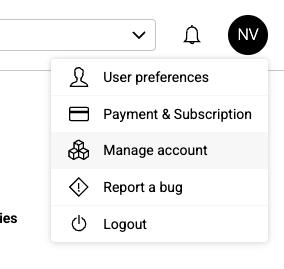
- Go to manage your account.
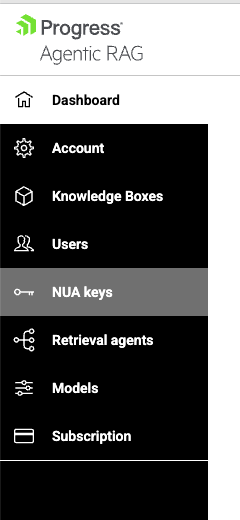
- Open NUA Keys.
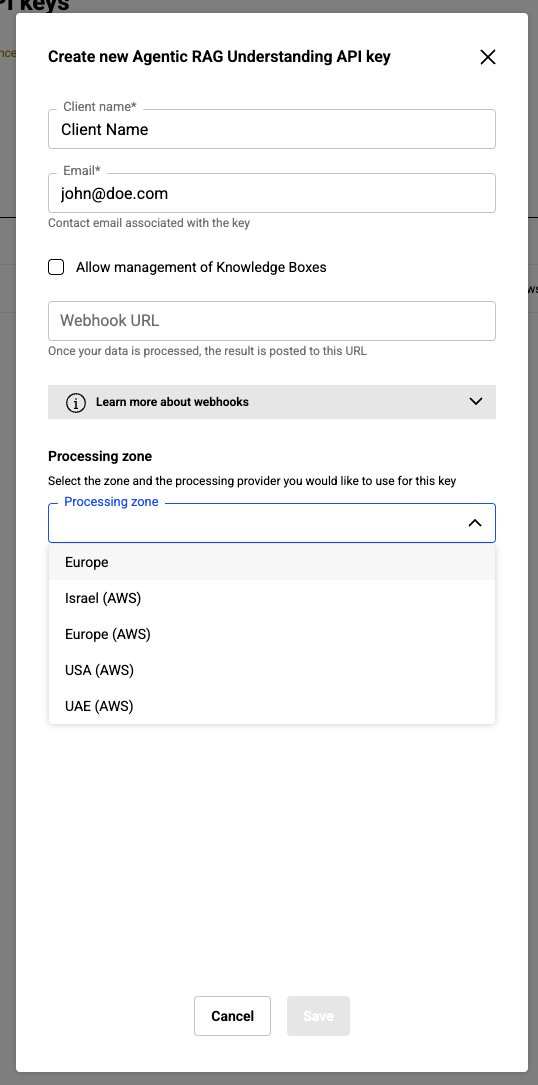
- Create a new key.
Configure the API endpoint
Use your zone id in the base URL:
https://[zone-id].dp.progress.cloud/api/v1/predict/compat
Authentication
Use your NUA key as a standard Bearer token. This works the same as OpenAI or OpenRouter.
Authorization: Bearer <NUA KEY>
Example integrations
OpenCode
Reference: https://opencode.ai/docs/providers/
Example ~/.config/opencode/opencode.json Setup for the AWS US region and 3 models. You may choose any of the available models and the region that best suits your needs:
{
  "$schema": "https://opencode.ai/config.json",
  "provider": {
    "nuclia": {
      "npm": "@ai-sdk/openai-compatible",
      "name": "NUA AWS",
      "options": {
        "baseURL": "https://aws-us-east-2-1.dp.progress.cloud/api/v1/predict/compat"
      },
      "models": {
        "aws-claude-4-5-sonnet": {
          "name": "AWS Claude 4.5 Sonnet" ,
          "variants": {
            "thinking": {
              "reasoningEffort": "high"
            },
            "fast": {}
          }
        },
        "aws-claude-4-5-haiku": { "name": "AWS Claude 4.5 Haiku" },
        "chatgpt4o": { "name": "GPT-4o" }
      }
    }
  },
  "model": "aws-claude-4-5-haiku",
  "small_model": "aws-claude-4-5-sonnet"
}
Example ~/.local/share/opencode/auth.json:
{
  "NUA AWS": {
    "type": "api",
    "key": "<NUA KEY>"
  }
}
GitHub Copilot CLI
Set the provider endpoint, your NUA key, and the model you want to use:
export NUA_KEY="<YOUR_NUA_KEY>"
export COPILOT_PROVIDER_BASE_URL="https://<ZONE_ID>.dp.progress.cloud/api/v1/predict/compat"
export COPILOT_PROVIDER_BEARER_TOKEN="${NUA_KEY}"
export COPILOT_MODEL="<MODEL_ID>"
Replace <ZONE_ID> with your zone, for example europe-1, and <MODEL_ID> with a model enabled for your NUA key.
List the models available to your key:
curl -sS \
  -H "Authorization: Bearer ${NUA_KEY}" \
  "https://<ZONE_ID>.dp.progress.cloud/api/v1/predict/compat/models" \
  | jq -r '.data[].id' \
  | sort
Start Copilot CLI:
copilot
Models used with Copilot CLI must support streaming and tool calling.
Supported Endpoints
- Chat Completions:
https://[zone-id].dp.progress.cloud/api/v1/predict/compat/chat/completions - Models:
https://[zone-id].dp.progress.cloud/api/v1/predict/compat/models - Embeddings:
https://[zone-id].dp.progress.cloud/api/v1/predict/compat/embeddings
Available models
Available models depend on your NUA key and region. Call the /models endpoint to list the models available to your key, or see Try Different LLMs for the complete list of model names and IDs.